Skip to content
  • Home
  • HEMS
    • HEMS Solution
    • enjoyelec App
    • HEMS Controller Air 2
    • Controller Pro
    • Controller Lite
    • Installer Portal
    • User Portal
  • Technology
    • iEMS
    • V2G
    • VPP
  • eco-partner
  • Library
    • Knowledge
    • Support Center
    • FAQ
    • Use Case
  • Company
    • About us
    • News
    • Contact us

Support center

Provide you with comprehensive product operation guidelines

End User

  • HEMS Controller
    • How to select two different models of controllers
    • Necessary Preparations Before Installing the Controller
    • Controller Installation
    • Pairing Controller and Connecting Home Devices in HEMS App
  • App General
    • Download and Registration
    • Setting Up Home Information
  • Prices
    • We support 30+ energy suppliers connected accross 11 countries
    • Access Dynamic Tariff
    • Connect Tibber Dynamic Electricity Tariff Plan
    • Connect Amber Dynamic Electricity Tariff Plan
  • Energy Device
    • Adding Devices
    • Adding Growatts Devices
    • Adding Deye Devices
    • Guide to Device Display
    • Guide to EV Charger Settings
    • Connect Home Battery for Efficient Energy Management
  • Automatic Strategy
    • Enabling Strategies
    • Create Own Energy Rules with enjoyelec’s New Automation Feature IFTTT
    • Smart Charging
    • Smart Heating
  • Usage analysis
    • Understanding Energy Usage
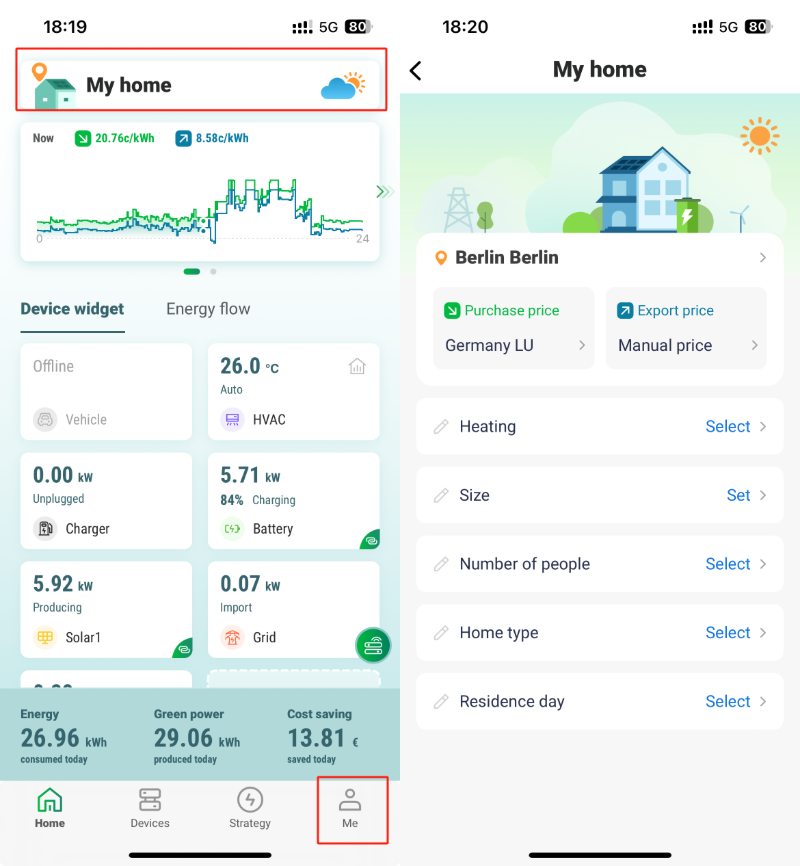
Click 'My home' at the top of the 'Home' page, or 'MY home' on the 'Me' page to make settings or changes.
On this page the user can modify the previously set tariff and some settings about the house details and living conditions.


HEMS

  • enjoyelec App
  • HEMS Controller Air 2
  • HEMS Controller Pro

Technology

  • iEMS
  • V2G
  • Virtual Power Plant

Library

  • Knowledge
  • Support Center
  • FAQ
  • Use Case

@enjoyelec.net

Page load link
Go to Top