

Support center
Provide you with comprehensive product operation guidelines
End User
Solar-Only Charging Guide:Charge your EV using only surplus solar energy
Make the most of your home’s solar power by charging your EV exclusively with surplus solar energy. Solar-Only Charging helps maximize self-consumption, reduce electricity costs, and minimize reliance on the grid.
This guide shows you how to activate this feature in the enjoyelec App.
1. What is Solar-Only Charging?
Solar-Only Charging allows your EV to charge using only surplus solar energy generated at home, without drawing electricity from the grid.
It is designed to help you:
- Maximize self-consumption of solar energy
- Reduce electricity costs
- Enable low-carbon, sustainable charging
Under optimal conditions, this enables 100% solar-powered EV charging and reduces reliance on grid electricity.

2. Before You Start (Requirements)
Make sure your system meets the following conditions:
System Requirements
- A compatible EV charger connected to the enjoyelec App via OCPP
(Only OCPP connections are supported. Tap here to view brand-specific charger connection guides.) - A functioning solar PV system whose inverter is connected to the enjoyelec App
(Tap here to view brand-specific inverter connection guides ) - A stable internet connection for real-time communication
Recommended Setup
- Latest version of the enjoyelec App
- Up-to-date charger firmware
Note: Solar-Only Charging cannot be used simultaneously with Smart Charging.

3.How Solar-Only Charging Works
The system continuously analyzes real-time solar generation and household consumption to control charging behaviors:
- When solar generation exceeds household demand, surplus energy is automatically allocated to EV charging.
- When solar output drops below the required threshold, charging pauses automatically.
- Charging resumes once sufficient solar energy is available again.
Single-phase chargers require a minimum surplus power to initiate charging, typically around 1.4 kW.
4.Activating Solar-Only Charging in the enjoyelec App
Step1: Connect your App to the charger
-Open the enjoyelec App
-Log in or register an account (You can easily register your account in the enjoyelec App)
-Add and connect your EV charger
(Tap here to view the brand-specific charger connection guides)
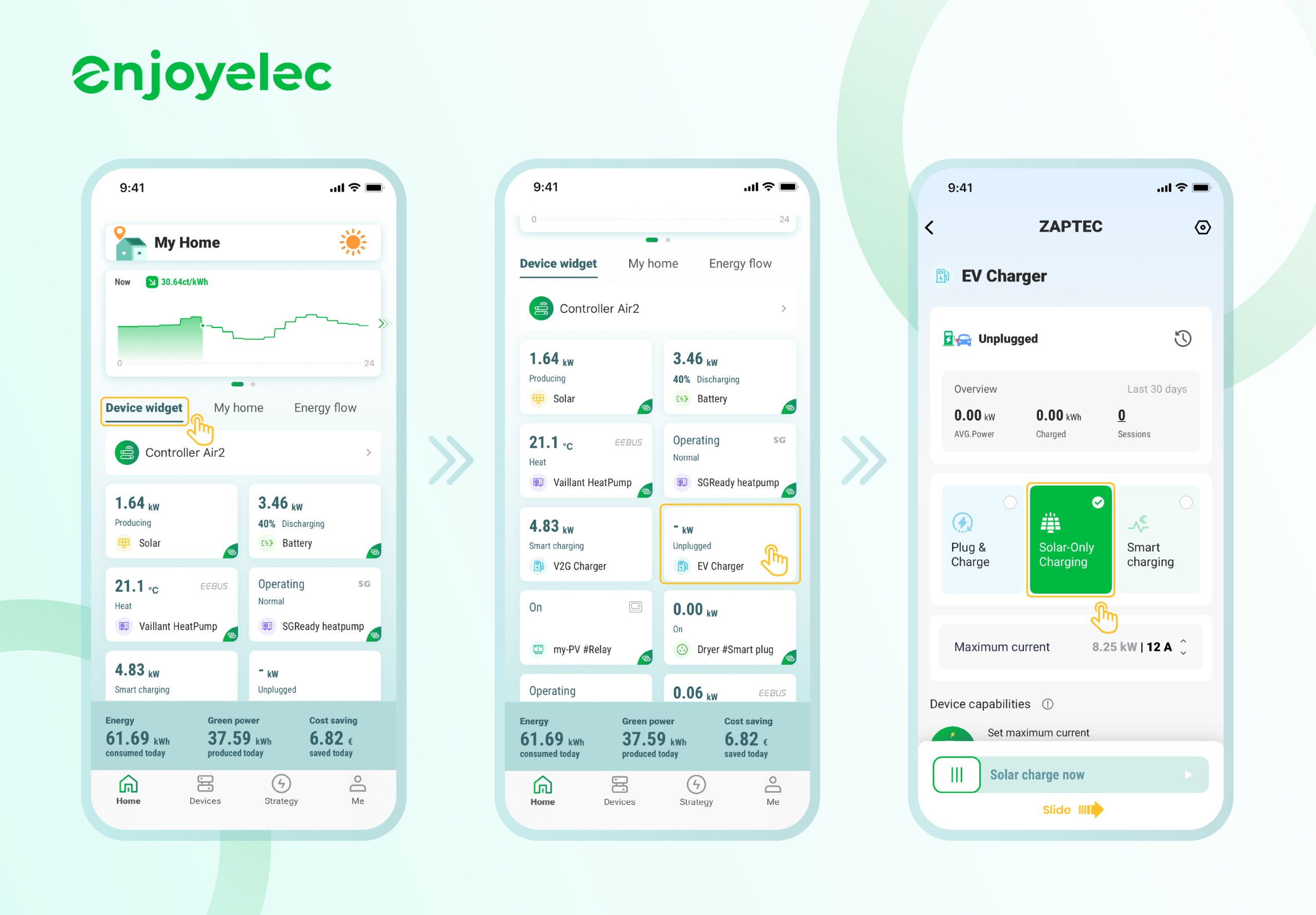
Step2: Start Solar-Only Charging
Follow these steps:
1. Plug in your EV
2. Open the enjoyelec App
- Tap the Device widget on the Home screen
- Tap EV charger
- Choose Solar Only Charging and set the maximum current as needed
- Slide Solar charge now to start
5.Troubleshooting
If the feature does not work, Please feel free to contact us.
Our team will investigate the issue and provide further guidance.